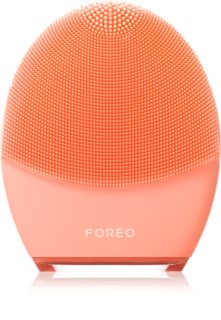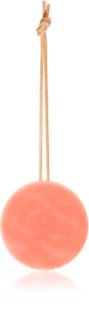



LUNA™ 4: PRO CLEANSE, HEALTHY GLOW, FLAWLESS PREP
Enjoy an effortless skincare routine & tackle signs of aging for clean, visibly brighter & healthier-looking skin. Tailored perfectly to your skincare needs, LUNA™ 4 offers the choice between Gentle, Regular, or Deep Cleansing modes & Firming Massage routines - creating a must-have skincare essential for pro-level results at home.
FEATURES:
✔ Personalized cleansing
✔ App-guided firming massages
✔ Relaxing T-Sonic™ pulsations
✔ Up to 600 uses per single USB charge
✔ Ultra-hygienic silicone
✔ Choose between Sensitive, Balanced or Combination, based on your skin type
HOW TO CLEANSE WITH LUNA™ 4:
1.UNLOCK DEVICE
Start by unlocking your device and registering your warranty via the FOREO For You app.
2.APPLY CLEANSER
Dampen your face and apply your regular face cleanser. For optimal results, we recommend FOREO Micro-Foam Cleanser. Then wet LUNA™ 4.
3.SELECT PREFERENCES
Press the universal button to turn on your device. You can choose between Gentle,
Regular or Deep Cleanse modes using the buttons on the device, for different areas of your face and neck.
4.CLEANSE
Glide the silicone touchpoints on the front of LUNA™ 4 in circular motions over your face/neck until skin is cleansed. Once finished, press the universal button to turn off your device, (or it will automatically turn off after 1 min). Then rinse face/neck and device.
HOW TO FIRM WITH LUNA™ 4:
1. APPLY SKINCARE
Apply a thin layer of FOREO SERUM SÉRUM SERUM, or your desired skincare products, to clean and dry skin.
2. ACTIVATE MASSAGE
Press the universal button once to turn on your device. Then double press the universal button to activate Firming Massage. Access guided Firming Massage treatments, or customize your massage via the FOREO app.
3. FIRM SKIN
Gently glide the back of the device from the center of your face to the outside of your face, in upward lines. Glide across your cheekbones and forehead, and over your jawline & neck, as desired.
4. FINISH
Your device will turn off automatically after 1 minute, or once your guided treatment is complete. Rinse the device with soap and water.
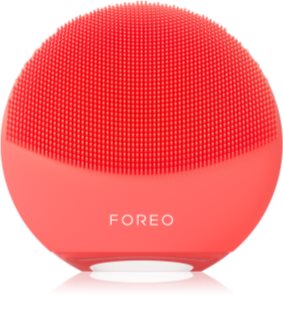
LUNA™ 4 mini: CLEAN, GLOWING, HEALTHY SKIN. EVERY DAY
Introducing your everyday skincare essential. The mini-but-mighty must-have for any skincare enthusiast, this smart device offers effortless facial cleansing and a healthy, radiant glow in just 1 min! Featuring a 2-zone brush head & quick 30-second Glow Boost mode for ultimate ease.
FEATURES:
✔ T-Sonic™ cleanse and massage
✔ 17% softer than LUNA™ mini 3
✔ Ultra-hygienic silicone
✔ Up to 500 uses per single USB charge
✔ Glow Boost mode
✔ Sustainable design, with no replacement parts needed - ever
HOW TO USE:
1. UNLOCK DEVICE
Start by unlocking your device and registering your warranty via the FOREO For You app.
2. APPLY CLEANSER
Dampen your face and apply your regular face cleanser. For optimal results, we recommend FOREO Micro-Foam Cleanser. Then wet LUNA™ 4 mini.
3. CLEANSE
Press the universal button to turn on your device. You can activate 30-sec Glow Boost mode by double-pressing the universal button, if desired. Then glide the device in circular motions over your face/neck until skin is cleansed.
4. RINSE
Once finished, press the universal button to turn off your device, (or it will automatically turn off after 1 min). Then rinse face/neck and device.
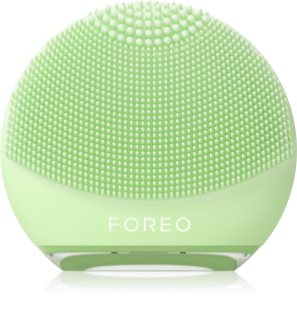
LUNA™ 4 go: SKINCARE ESSENTIAL FOR A FRESH GLOW ON-THE-GO
Effortless 1 minute facial cleanse? Check. Targeted firming facial massage? Check. Light, compact & travel-friendly? Check. Fresh, healthy-looking radiance? You know it!
LUNA™ 4 go is perfect for the times when you really need to cleanse your skin while out and about — after sweating at the gym, sleeping on a flight, or lying on the beach.
FEATURES:
✔ T-Sonic™ cleanse and massage
✔ 8 adjustable intensities
✔ Ultra-hygienic silicone
✔ 38% softer than LUNA™ go
✔ Travel-friendly with travel-lock
✔ Up to 300 uses per single USB charge
HOW TO USE:
1. APPLY CLEANSER
Dampen your face and apply your regular face cleanser. For optimal results, we recommend FOREO Micro-Foam Cleanser. Then wet LUNA™ 4 go.
2. CLEANSE
Press the universal button to turn on your device. You can adjust the intensity of the T-Sonic™ pulsations with the + and - buttons. Then glide the device in circular motions over your face/neck until skin is cleansed.
3. RINSE
Once finished, press the universal button to turn off your device, (or it will automatically turn off after 1 min). Then rinse face/neck and device.
4. MASSAGE (optional)
Apply a thin layer of FOREO SERUM SÉRUM SERUM, or your desired skincare products, to clean and dry skin. Press the universal button once to turn on your device. Gently glide the back of the device from the center of your face to the outside of your face, in upward lines.
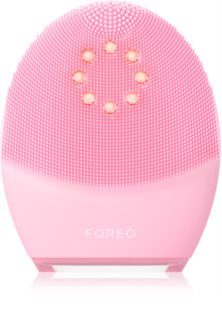
LUNA™ 4 plus: CLEANSE YOUR SKIN & TARGET SIGNS OF AGING. AT THE SAME TIME
Indulge your skin in a gentle cleanse, while simultaneously tackling signs of aging on your face and neck. A combination of NIR (near infrared) and red LED light and targeted microcurrent massage help refine the complexion, so your skin looks visibly brighter and firmer in minutes.
FEATURES:
✔ NIR LED light heated cleansing
✔ Microcurrent facial featuring Anti-Shock System™.
✔ Red LED light facial treatment
✔ Relaxing T-Sonic™ pulsations
✔ Ultra-hygienic silicone
✔ App-guided firming massages
✔ Extreme battery life
HOW TO CLEANSE WITH LUNA™ 4 plus:
1. UNLOCK DEVICE
Start by unlocking your device and registering your warranty via the FOREO For You app.
2. APPLY CLEANSER
Dampen your face and apply your regular face cleanser. For optimal results, we recommend FOREO Micro-Foam Cleanser. Then wet LUNA™ 4 plus.
3. SELECT PREFERENCES
Press the universal button to turn on your device. You can choose between Gentle, Regular or Deep Cleanse modes using the buttons on the device, for different areas of your face and neck.
4. CLEANSE
Glide the silicone touchpoints on the front of LUNA™ 4 plus in circular motions over your face/neck until skin is cleansed. Once finished, press the universal button to turn off your device, (or it will automatically turn off after 1 min). Then rinse face/neck and device, and pat dry both.
HOW TO TONE WITH LUNA™ 4 plus:
1. APPLY SERUM
Apply a thin layer of FOREO SERUM SÉRUM SERUM to clean and dry skin.
2. ACTIVATE MASSAGE
Press the universal button once to turn on your device. Then double press the universal button to activate Microcurrent Massage. Access guided Microcurrent Massage treatments, or customize your massage via the FOREO app.
3. FIRM SKIN
Gently glide the back of the device from the center of your face to the outside of your face, in upward lines. Glide across your cheekbones and forehead, and over your jawline & neck, as desired.
4. FINISH
Your device will turn off automatically after 1 minute, or once your guided treatment is complete. Rinse the device with soap and water.
LUNA™ 4 body: ULTRA-HYGIENIC FULL BODY SPA
Did you know that your skin accumulates over 4 kilos of dirt and dead skin cells in a year? Cleansing your skin with your hands is a lot less effective than you might think. That's why FOREO created a smart massaging body brush that is clinically proven to remove 99% of dirt and oil from skin. Indulge in a profoundly purifying daily experience with this velvety-soft silicone body brush, powered by T-Sonic™ pulsations - to cleanse, soften & smooth skin.
FEATURES:
✔ T-Sonic™ cleanse and massage
✔ Ultra-hygienic silicone
✔ Adaptable brush head
✔ Travel-friendly
✔ Extreme battery life
HOW TO USE:
1.APPLY SOAP
Wet your body and apply your regular shower gel or soap. Then wet the LUNA™ 4 body.
2.CLEANSE
Press the universal button to turn on your device. You can adjust the intensity of the T-Sonic™ massage with the + and - buttons. Then glide the device in circular motions over your body until skin is cleansed.
3.RINSE
Once finished, press the universal button to turn off your device, (or it will automatically turn off after 3 mins). Then rinse the body and device. Leave the device to air dry.

LUNA™ 4 MEN: FOR THE DEEPEST CLEANSE & SMOOTHEST SHAVE
LUNA™ 4 MEN is a 2-IN-1 smart facial cleansing and firming device for skin and beard. It provides a tailored cleanse, based on skin type and problem areas. It firms skin, using guided massages to tighten specific areas of the face and neck. And it perfectly preps skin for shaving. LUNA™ 4 MEN is the busy man’s must-have skincare essential.
FEATURES:
✔ T-Sonic™ cleanse
✔ Ultra-hygienic silicone
✔ App-guided firming massages
✔ Customizable modes & duration
✔ Extreme battery life
HOW TO CLEANSE WITH LUNA™ 4:
1. UNLOCK DEVICE
Start by unlocking your device and registering your warranty via the FOREO For You app.
2. APPLY CLEANSER
Dampen your face and apply your regular face cleanser. For optimal results, we recommend FOREO Micro-Foam Cleanser. Then wet LUNA™ 4 MEN.
3. SELECT PREFERENCES
Press the universal button to turn on your device. You can choose between Gentle, Regular or Deep Cleanse modes using the buttons on the device, for different areas of your face and neck.
4. CLEANSE
Glide the silicone touchpoints on the front of LUNA™ 4 MEN in circular motions over your face/neck until skin is cleansed. Once finished, press the universal button to turn off your device, (or it will automatically turn off after 1 min). Then rinse face/neck and device.
HOW TO FIRM WITH LUNA™ 4:
1. APPLY SKINCARE
Apply a thin layer of FOREO SERUM SÉRUM SERUM, or your desired skincare products, to clean and dry skin.
2. ACTIVATE MASSAGE
Press the universal button once to turn on your device. Then double press the universal button to activate Firming Massage. Access guided Firming Massage treatments, or customize your massage via the FOREO app.
3. FIRM SKIN
Gently glide the back of the device from the center of your face to the outside of your face, in upward lines. Glide across your cheekbones and forehead, and over your jawline & neck, as desired.
4. FINISH
Your device will turn off automatically after 1 minute, or once your guided treatment is complete. Rinse the device with soap and water.